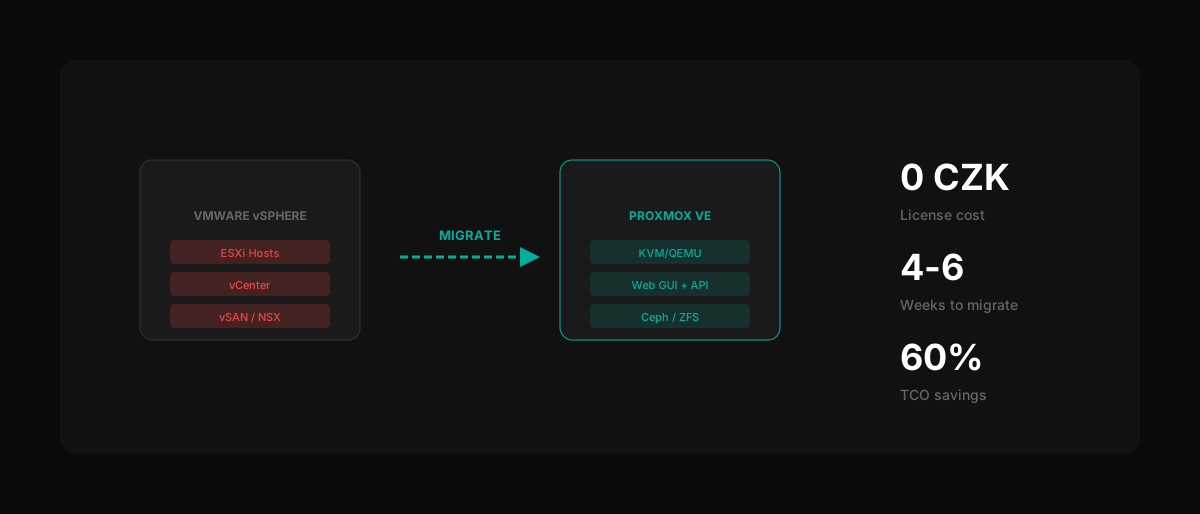
Proxmox VE is one of the fastest paths away from VMware licensing costs. With zero license fees, KVM/LXC virtualization, and built-in clustering, Proxmox handles 80% of what vSphere does for small-to-medium environments. This guide covers the complete migration process — from initial assessment through production cutover — with real-world timelines, tooling, and cost data from Pro-zeta's migration practice.
Why should you migrate from VMware to Proxmox in 2026?
Broadcom's acquisition of VMware in November 2023 triggered the largest licensing upheaval in enterprise virtualization history. Perpetual licenses were terminated in February 2024, replaced by subscription-only bundles with 72-core minimums. For Czech enterprises running 50–100 servers, annual VMware licensing now costs 340,000–500,000 CZK. Proxmox VE costs exactly 0 CZK in license fees — support subscriptions are optional and start at approximately 2,200 CZK/server/year.
Key reasons to migrate now:
- Cost elimination: VMware vSphere Standard for 100 servers: ~450,000 CZK/year. Proxmox VE: 0 CZK license + optional support.
- No forced bundles: Broadcom requires purchasing VMware Cloud Foundation or vSphere Foundation — you pay for components you don't use.
- Open source foundation: Proxmox runs on KVM (Linux kernel) and LXC. No single vendor controls the hypervisor.
- Familiar management: Web-based UI, REST API, CLI tools. vSphere admins can become productive within 1–2 weeks.
- Active community: Over 300,000 Proxmox installations globally, with enterprise adoption accelerating since 2024.
The VMware alternative landscape has matured significantly. Proxmox is the right fit for environments that need simple, reliable virtualization without the complexity of a full cloud platform.
Is your environment ready for Proxmox migration?
Before touching any migration tools, you need a thorough assessment. Approximately 15% of migration projects stall because of undocumented dependencies or incompatible workloads discovered mid-migration. A structured assessment takes 3–5 days for most environments and prevents weeks of troubleshooting later.
Pre-migration checklist
| Assessment area | What to document | Why it matters |
|---|---|---|
| VM inventory | Count, OS, vCPU, RAM, disk size per VM | Sizes target Proxmox cluster |
| Storage topology | VMFS, NFS, vSAN, total capacity, IOPS | Determines storage backend choice |
| Network config | VLANs, port groups, distributed switches, NSX rules | Must be recreated in Proxmox (Linux bridges/OVS) |
| Application dependencies | Inter-VM communication, shared storage, clusters | Defines migration wave grouping |
| Hardware compatibility | Server model, CPU generation, NIC/HBA models | Verify Proxmox/Debian driver support |
| VMware-specific features | DRS, HA, vMotion, FT, VSAN | Map to Proxmox equivalents or identify gaps |
| Licensing contracts | Renewal dates, EA terms, support expiry | Determines migration deadline |
VMware feature mapping to Proxmox
- vMotion → Proxmox Live Migration (requires shared storage or local migration with downtime)
- vSphere HA → Proxmox HA Manager (Corosync-based fencing)
- DRS → No direct equivalent. Manual VM placement or third-party scripts.
- vSAN → Ceph (integrated), ZFS local storage, or external SAN
- NSX → Open vSwitch (OVS) or Linux bridges + SDN plugin (Proxmox 8.x)
- vCenter → Proxmox Datacenter Manager (centralized multi-cluster management)
What tools do you need for VMware to Proxmox migration?
The migration toolchain depends on your approach: offline conversion (recommended for most cases) or online/live migration (for near-zero-downtime requirements). Proxmox supports VMDK, QCOW2, and raw disk formats natively. The key challenge is converting VMware's VMDK files and adapting VM configuration.
Core migration tools
1. qm importdisk (Proxmox built-in)
The simplest approach for VMDK-to-Proxmox conversion. Available directly on every Proxmox host.
`bash # Import a VMDK disk to a Proxmox VM qm importdisk
Example: Import VM disk to local-lvm storage
qm importdisk 101 server-web01-flat.vmdk local-lvm --format raw
`
Works well for individual VMs. For bulk migrations (50+ VMs), scripting is recommended.
2. qemu-img convert
Low-level disk conversion utility. Useful for pre-processing VMDK files before import.
`bash # Convert VMDK to QCOW2 qemu-img convert -f vmdk -O qcow2 source.vmdk destination.qcow2
Convert with compression (saves transfer time)
qemu-img convert -f vmdk -O qcow2 -c source.vmdk destination.qcow2
`
3. V2V converter (virt-v2v)
Red Hat's virtual-to-virtual conversion tool. Handles driver injection (VirtIO) automatically, which is critical for Windows VMs.
`bash # Convert from VMware vCenter directly virt-v2v -i vmx /vmfs/volumes/datastore/vm/vm.vmx -o local -os /var/tmp
Convert from OVA export
virt-v2v -i ova exported-vm.ova -o local -os /var/tmp
`
4. Bulk migration scripts
For environments with 50+ VMs, Pro-zeta uses automated migration pipelines:
- Export VMs from vSphere (OVF/OVA or direct VMDK copy)
- Convert disks in parallel (qemu-img)
- Create Proxmox VM configurations from vSphere metadata
- Import disks and attach to VMs
- Post-import driver injection and validation
Windows VM considerations
Windows VMs require VirtIO drivers for disk and network access under KVM. Without them, the VM will not boot or will have no network connectivity.
- Download VirtIO ISO from Proxmox (fedorapeople.org mirrors)
- Attach ISO to the VM after import
- Install VirtIO SCSI, NetKVM, and Balloon drivers
- For automated migration, inject drivers pre-boot using virt-v2v
How do you execute the migration step by step?
A structured migration follows five phases. Each phase has clear entry and exit criteria to minimize risk. The total timeline depends on environment size, but most organizations complete the migration within 2–8 weeks.
Phase 1: Prepare target infrastructure (Week 1)
- Install Proxmox VE 8.x on target servers (Debian 12 base)
- Configure networking: bridges, VLANs, bonding to match VMware port groups
- Set up storage: local ZFS, Ceph cluster, or connect to existing SAN/NAS
- Create Proxmox cluster (3+ nodes recommended for HA quorum)
- Test HA failover with a dummy VM before migrating production workloads
Phase 2: Pilot migration (Week 2)
- Select 3–5 non-critical VMs representing different OS types (Linux, Windows)
- Export from vSphere (OVF or VMDK copy)
- Import using qm importdisk or virt-v2v
- Verify: boot, network, storage, application functionality
- Run performance baseline comparison against VMware metrics
- Document any issues and their resolutions
Phase 3: Bulk migration (Weeks 3–6)
- Group VMs into migration waves by application dependency
- Wave 1: Development/test environments
- Wave 2: Internal services (monitoring, CI/CD, file servers)
- Wave 3: Production workloads (with maintenance windows)
- Wave 4: Business-critical applications (with rollback plan)
Phase 4: Validation (Week 6–7)
- Run full application test suites on migrated VMs
- Verify backup/restore procedures on Proxmox (PBS or third-party)
- Test HA failover for critical workloads
- Compare performance metrics: CPU, memory, disk IOPS, network throughput
- Validate monitoring integration (Prometheus, Zabbix, etc.)
Phase 5: Decommission VMware (Week 7–8)
- Run parallel for 1–2 weeks (VMware as fallback)
- Confirm all workloads stable on Proxmox
- Shut down vSphere hosts
- Terminate VMware licenses (or let them expire)
- Repurpose or decommission ESXi hardware
Migration timeline by environment size
| Environment size | VM count | Storage (TB) | Migration duration | Downtime per VM |
|---|---|---|---|---|
| Small | 10–30 VMs | 2–10 TB | 2–3 weeks | 15–30 min |
| Medium | 30–100 VMs | 10–50 TB | 4–6 weeks | 15–60 min |
| Large | 100–500 VMs | 50–200 TB | 8–16 weeks | 30–120 min |
| Enterprise | 500+ VMs | 200+ TB | 16–30 weeks | Varies |
Downtime per VM assumes offline migration with VMDK copy. Near-zero-downtime approaches (block-level replication) add complexity but reduce the window to under 5 minutes.
How much does VMware to Proxmox migration actually save?
The licensing cost difference is significant, but total cost of ownership includes migration effort, retraining, and ongoing operations. Here is a realistic cost comparison for a 100-server environment typical of Czech mid-size enterprises.
Cost comparison: VMware vs. Proxmox (100 servers, 3-year TCO)
| Cost category | VMware (3 years) | Proxmox (3 years) |
|---|---|---|
| Hypervisor licensing | 1,020,000–1,500,000 CZK | 0 CZK |
| Optional support subscription | Included in license | 220,000–660,000 CZK |
| Migration project cost | N/A | 200,000–400,000 CZK |
| Admin retraining | N/A | 50,000–100,000 CZK |
| Total 3-year cost | 1,020,000–1,500,000 CZK | 470,000–1,160,000 CZK |
| Annual savings | — | ~180,000–340,000 CZK/year |
These figures assume Proxmox Community or Standard support subscriptions. Enterprise support adds approximately 5,500 CZK/server/year.
When is Proxmox NOT the right VMware replacement?
Proxmox is excellent for straightforward server virtualization, but it has architectural limits. Approximately 20% of VMware environments we assess at Pro-zeta need capabilities beyond what Proxmox offers. Be honest about your requirements before committing.
Proxmox is not enough when you need:
- Multi-tenant isolation — Proxmox has basic permission roles but lacks project-level network and compute isolation. OpenStack provides full tenant separation with Keystone + Neutron.
- API-driven provisioning at scale — Proxmox has a REST API, but it was not designed for 500+ VM self-service provisioning. OpenStack's Heat/Terraform integration is far more mature.
- Software-defined networking (SDN) — Proxmox's SDN plugin (EVPN/VXLAN) is functional but limited compared to Neutron with OVN.
- Kubernetes-native infrastructure — Running Kubernetes on Proxmox works, but lacks integrated load balancers, persistent volume provisioning, and network policies that OpenStack Magnum or bare-metal K8s provide.
- Compliance at scale — ISO 27001/9001 certified infrastructure with SLA guarantees typically requires a managed cloud platform, not self-managed Proxmox.
When Proxmox falls short, Pro-zeta's Tier5 OpenStack cloud fills the gap — managed OpenStack with BlackStor storage, ISO 27001+9001 certification, and a Prague-based datacenter. No noisy neighbors, no shared infrastructure.
What are the most common migration mistakes?
After completing over 60 VMware migration projects, Pro-zeta has identified recurring patterns that delay or complicate migrations. Avoiding these saves an average of 2–3 weeks per project.
- Skipping the assessment — "We only have 50 VMs, how hard can it be?" Hard, when 12 of them have undocumented NFS mounts and 3 run on VMware-specific paravirtual drivers.
- Ignoring VirtIO drivers — Windows VMs without VirtIO drivers will not boot on KVM. Always inject drivers before cutover.
- Copying network config blindly — VMware distributed switches do not map 1:1 to Linux bridges. Redesign the network topology for Proxmox.
- No rollback plan — Keep VMware running in parallel for at least 1 week after migration. Do not decommission prematurely.
- Underestimating storage migration time — Copying 50 TB of VMDK files over 10 Gbps takes ~12 hours minimum. Plan for it.
How can Pro-zeta help with your VMware to Proxmox migration?
Pro-zeta has been building virtualization infrastructure since 1991 and operating production clouds since 2016. We offer three levels of migration assistance.
- Assessment only — We audit your VMware environment and deliver a migration roadmap with timeline and cost estimates. Typical duration: 1 week.
- Guided migration — Pro-zeta engineers work alongside your team, providing tools, scripts, and expertise. You execute, we guide and troubleshoot.
- Full managed migration — Pro-zeta handles the entire project end-to-end, from assessment through decommissioning VMware. Includes 30-day post-migration support.
Whether you choose Proxmox for straightforward virtualization or Tier5 OpenStack for enterprise cloud, Pro-zeta provides the infrastructure expertise and Prague-based support to make your VMware exit successful.